
So you might be using the NICEIC cert software in demo mode and now you want to register to use all the features and use numbers on your certificates.
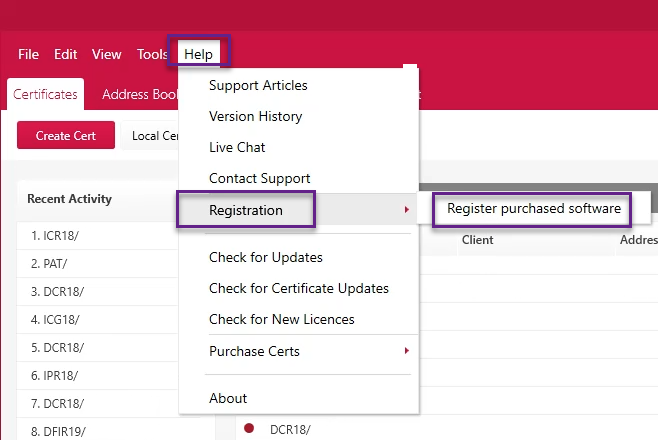
Firstly, go to Help > Registration > Register Purchased Software.
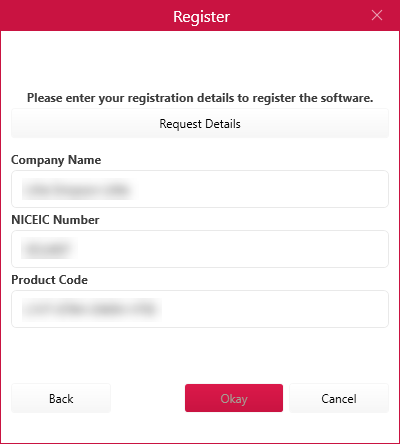
Next select ‘Yes’ if you’ve used the previous NICEIC Cert Software and ‘No’ if you have not. If you selected ‘Yes’ you will need to fill in your ‘Company Name’, ‘NICEIC Number’ and ‘Product Code’. If you’re unsure of these then please email us on support@cliksoftware.com or simply select the 'Request Details' option and complete the form.
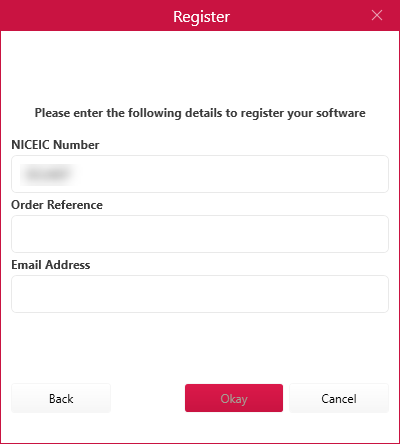
If you’ve selected ‘No’ you will need to fill in your NICEIC Number, Order Reference and Email Address. Once you’ve completed that click ‘Okay’. If you need these details please contact us on support@cliksoftware.com.
July 2019
Comments
0 comments
Article is closed for comments.