
When you raise an invoice in Clik Service you have the option to mark the invoice as paid, but you can do this two different ways:
- Within the invoice itself click on the 'Tools' menu and select 'Mark invoice as paid'.
- Right-click on the invoice from the invoice list and select 'Mark invoice as paid' from the drop-down menu.
Unpaid Invoices
To see which invoices remain unpaid, you will first need to ensure your user account has the correct privileges to access the reports module.
To view the unpaid invoices report click on Reporting > Pre-configured reports > Invoice > Unpaid invoices.
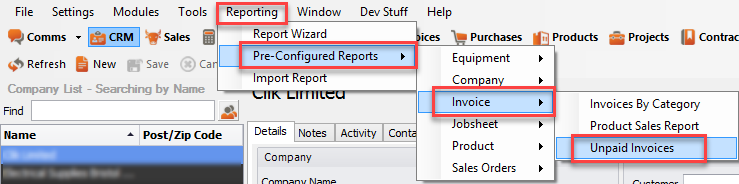
The report will load all unpaid invoices. You can then print or email it as required.

Statements
You can produce a statement of outstanding invoices for any customer by simply going to the CRM and selecting them from the list.
Click on 'Print' on the right-hand side of the CRM details and select 'Company record' from the drop-down menu.

From the print options, select the statement template (you may have to tick 'Show all' to see this) and a statement can now be printed, emailed or converted to PDF.
Comments
0 comments
Article is closed for comments.