
This article will show you how to register and activate your Clik Service software or new license.
When you install Clik Service and run the software for the first time, you will be prompted to register it. This applies if you are using the demo or have purchased licences.
Registration
First, fill out the company contact details before clicking on 'send activation email'.
An email will be sent to the email address specified.
NOTE: You will need an active internet connection to activate online.
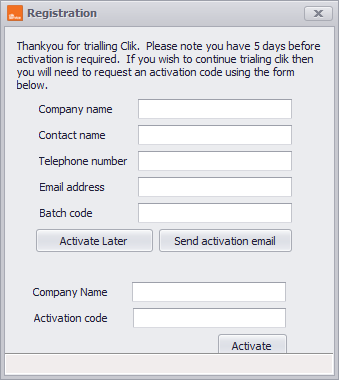
Once you receive the email, copy and paste the code into the batch code box and click 'OK'.
The software is now registered.
Activation
If you have purchased Clik or added additional licences you can enter the activation code given to you by our sales or technical team.
Enter your company name and activation code, then click 'Activate' to complete the process.
NOTE: You will need an active internet connection to activate online.
If you cannot activate online, please call tech support on 0117 902 2012.
Published: August 2016
Last Updated: February 2021
Comments
0 comments
Article is closed for comments.