
Read on to find out how to edit the settings for your contracts.
Find the setting options by clicking on Settings > Settings > Contracts.
This window is where you can set up the default settings for your contract wizard.
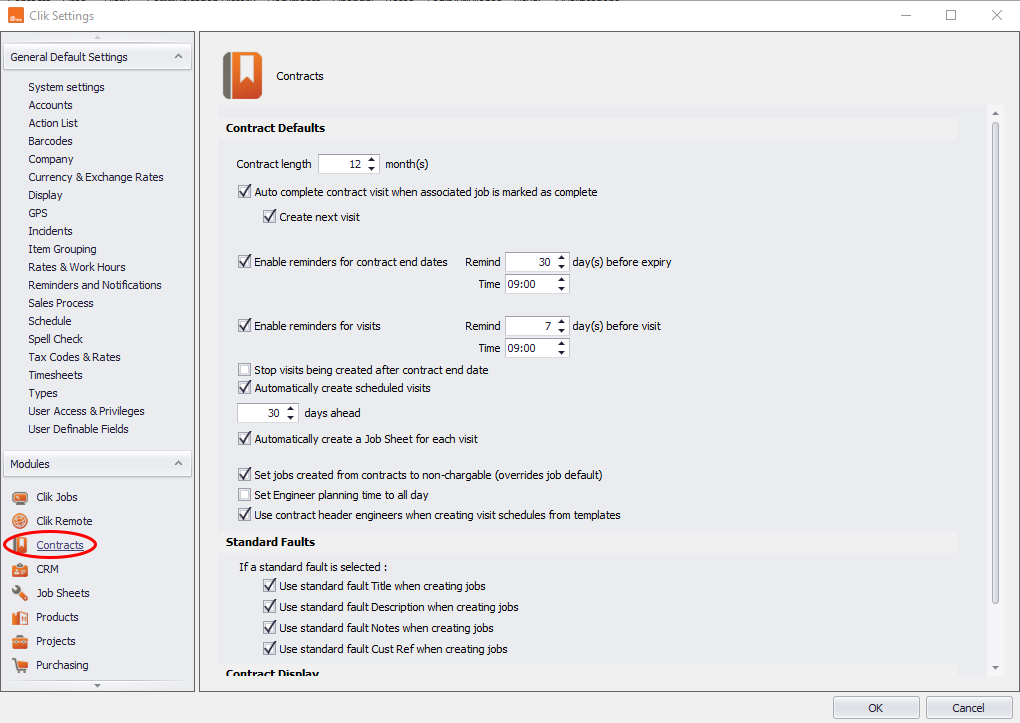
Here's how to use the settings:
- Contract length is the length of time the contract wizard will default to from today's date.
- Auto-complete contract visit when associated job is marked as complete - This will mark planned contract visits as complete when the job sheet raised from it are completed.
- Reminders for contract dates & reminders for contract visits will allow you to set the default reminder time for each event.
- Automatically create scheduled visits allows you to define how many days ahead of a due visit that the contract raises the visit details. Unlike Clik Service 3 only the next contract visit is raised.
- Automatically create a job sheet for each visit allows you to let the system automatically raise job sheets when a contract visit is due.
Comments
0 comments
Article is closed for comments.