
This article will show you how to enable job sheet colouring in the engineers' diary & job details screen
Once you have set colours for your job types, you can then get these colours to show in the engineer’s diary. Following the below instructions will also colour the types in the job details screen.
First, go to settings > settings > schedule.
You then need to go down to the formatting section.

If you require job colours on the engineer schedule, tick the 'Enable job colouring' box and choose the field you want to set up.
Next, click the 'Setup' button.

When you’ve clicked the setup button you can then change the colours to match the field’s description. Once finished click 'OK'.
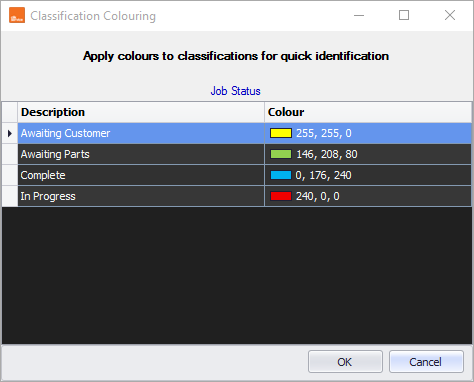
Now if you go to the engineer schedule in Diary > Engineer schedule, you will now see the job status and the assigned colours.

Comments
0 comments
Article is closed for comments.